Zoom favours ‘Chats’ rather than lessons (in its default format).
Musicians have to change that default setting because Zoom aggressively removes anything that doesn't resemble speech.
Zoom has a smart noise suppression algorithm that has been setup with parameters at Zoom central that filter out ‘background’ sounds in both the frequency and the ‘time’ realms.
Amazingly you can speak into the system and the audio makes it past the gatekeeper and reaches the far end intelligibly…if you, however, strike a drum only a few milliseconds of that sound will make it through and any subsequent drum beats will get gated/compressed…Its ability to analyse the envelope of incoming sounds (attack decay sustain release) and react to that sound so quickly is amazing…Speech fine, sharp transient/attack…gone!
For an online music lesson the noise suppression ‘Smarts’ have to be toggled to OFF! And there are at numerous settings that inform the default algorithm…and you have to ‘undo’ them all!
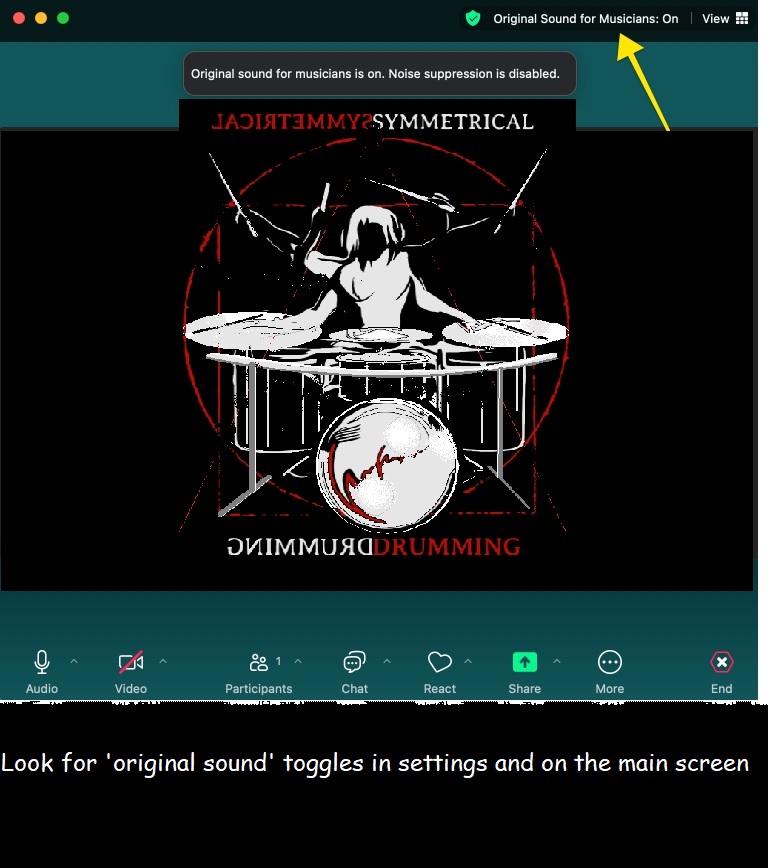
Look far and wide for the settings ‘gear or cog’ icon and go into the Audio/Sound section or your Apple or Windows machine…dig deep into Zoom(pic of a microphone) and turn off all the automatic settings and select direct sound original sound options where you can…and doing the same in the windows or mac operating system keeps the sound simpler for inputing into Zoom….turn all the settings back to basic…keep the sound
‘un-enhanced’!
Don't forget the final button that needs to ‘turned on’ (its counterintuitive after that ‘off’ checking…. on the main screen…as in the pic above…its tiny line of text and often overlooked. Most online help forgets to mention that line of text which doesnt look like a button at all!
A thorough account of the whole process is here:
https://www.lessonface.com/zoomaudio
Both the teacher and the student have to be able to setup zoom without its noise suppression!
Go exploring Zoom and get to know its quirks before you sign up for an online lessons at
https://symmetricaldrummingaustralia.org
https://marcuscampbellorum.com
See you online…
Mark